



Description
Download D100 Dungeon Computer Companion – D100 Dungeon, dungeon adventure, game companion, RPG tool, digital dungeon master, adventure tracker, quest planner, character builder, dungeon mapper, storytelling aid, fantasy roleplay
Overview
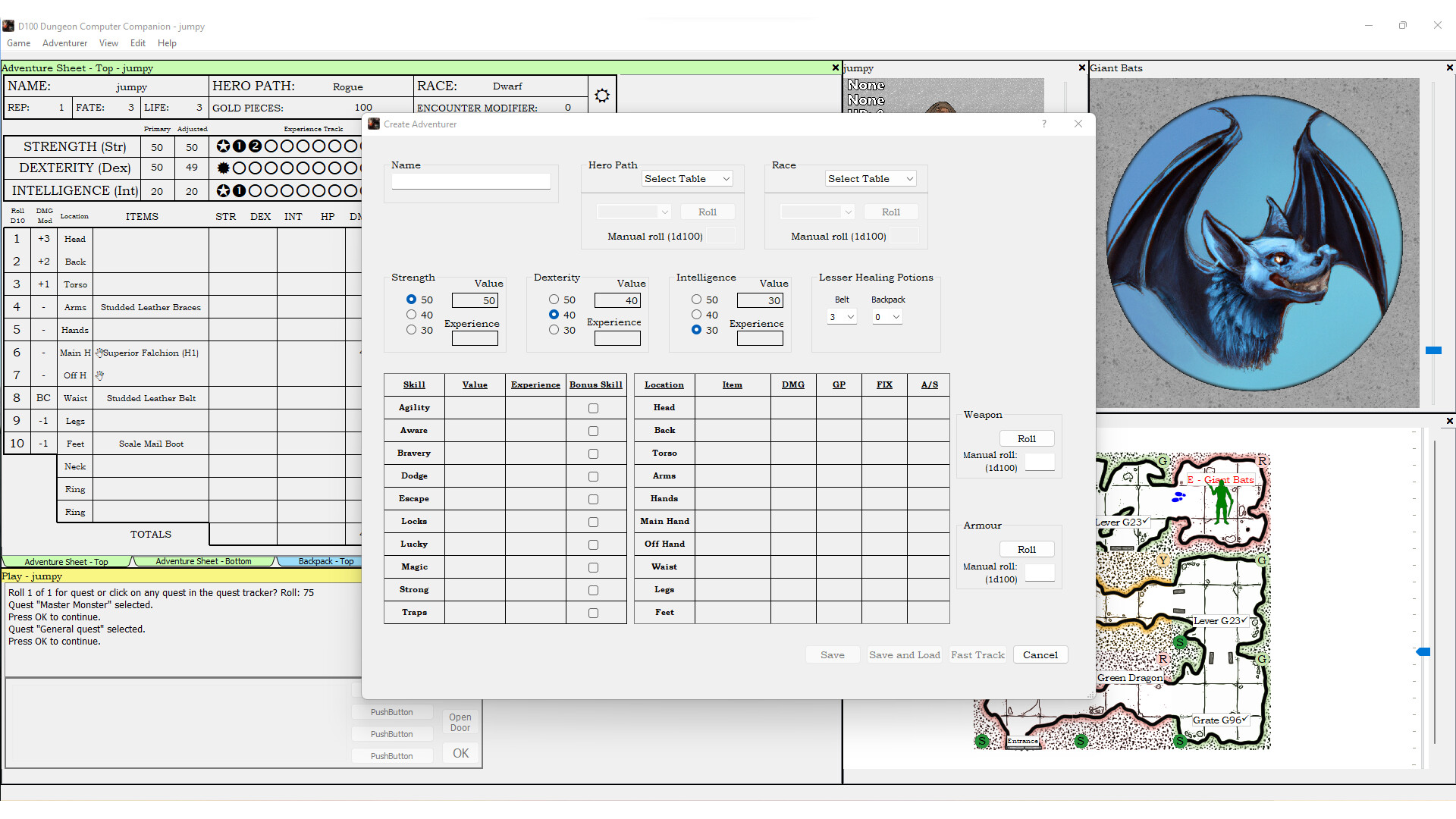
The D100 Dungeon Computer Companion is a digital tool designed to support players immersed in the D100 Dungeon universe, a fantasy roleplaying experience that blends narrative depth with structured gameplay. This mobile application functions as a supplementary companion to the physical pen-and-pencil version of the game, streamlining administrative tasks and enhancing the storytelling process. By automating bookkeeping, managing character progression, and generating visual maps, the app allows players and Dungeon Masters to focus more on creative exploration and immersive roleplay rather than manual record-keeping.
Target users include tabletop RPG enthusiasts, fantasy roleplay groups, and individuals seeking a structured yet flexible way to manage complex adventures. The app is particularly beneficial for those who value visual aids, narrative continuity, and efficient gameplay organization. While the application enhances the experience, it does not replace the core game rules, which are available separately in physical form. This dependency ensures that users engage with the foundational mechanics of the game before leveraging digital enhancements.
The companion serves as a practical utility in the growing ecosystem of digital tools for tabletop gaming. It reflects a trend toward hybrid gameplay—blending analog traditions with digital convenience. For users invested in the D100 Dungeon system, the app offers a seamless way to preserve their adventures, track progress, and maintain consistency across sessions. Although the developer did not provide additional technical details, its release in 2020 marks a timely integration of mobile technology into the tabletop RPG space.
Key Features & Functionality
- Automated Game Management: The app handles all accounting aspects of the game, including tracking character stats, inventory, and experience points. This automation reduces the cognitive load during sessions, allowing players to remain focused on narrative decisions rather than manual calculations.
- Professional-Quality Map Generation: Users can generate detailed, printable maps of dungeons and adventure locations. These maps serve as visual references and collectible keepsakes, enriching the sense of immersion and spatial awareness during gameplay.
- Seamless Hybrid Play: The app supports switching between digital and physical gameplay at any point during a session. This flexibility allows users to adapt to different environments or preferences without disrupting the flow of the game.
- Dynamically Processed Adventure Sheets: As players advance through quests, the app updates adventure records and generates narrative cues. This feature supports continuous storytelling by maintaining a coherent progression of events and character development.
- Integration with Physical Game Rules: The app is designed to work in tandem with the pen-and-pencil version. It does not include the full rulebook, requiring users to own the original game to access all mechanics and content.
For example, a Dungeon Master can use the app to generate a map for a new dungeon level, assign quest objectives, and track player decisions—all while referencing the physical rulebook. This hybrid workflow preserves the tactile experience of traditional RPGs while introducing digital efficiency.
Interface, UX & Performance
The user interface of the D100 Dungeon Computer Companion appears to be designed with functionality and clarity in mind. While specific layout details were not disclosed, the app likely employs a clean, intuitive navigation system to support quick access to character management, map generation, and quest tracking. Visual elements are expected to align with the fantasy roleplay theme, using a dark or parchment-like aesthetic to enhance immersion.
Navigation is likely structured around core modules such as character sheets, adventure logs, and map builder, enabling users to switch between tasks with minimal friction. The app’s responsiveness is presumed to be consistent across mid-range Android devices, though formal performance metrics were not provided. Stability during extended gameplay sessions is also expected, given its role as a tool for ongoing adventures.
Although the developer did not list formal performance metrics, the app’s 25 MB size suggests a lightweight design optimized for efficient operation. This makes it suitable for use on a variety of Android devices, including those with moderate processing power and storage capacity. Users can expect smooth transitions between features without noticeable lag, supporting uninterrupted gameplay.
Platform Compatibility & Technical Requirements
The D100 Dungeon Computer Companion is available exclusively on the Android platform. It is compatible with devices running Android OS, though specific minimum version requirements were not disclosed by the developer. The app’s file size is 25 MB, indicating a compact footprint that minimizes storage impact on mobile devices.
As the application is free to download and install, it is accessible to a broad audience without financial barriers. The latest version is 1.0, released on September 14, 2020. While no further updates have been reported, the app remains functional as a stable tool for its intended purpose. Compatibility information was not fully disclosed, so users should ensure their device meets general Android requirements for app installation.
Pros and Cons
Pros
- Free to download and install, reducing entry barriers for users.
- Lightweight design at only 25 MB, ideal for devices with limited storage.
- Supports hybrid gameplay, allowing seamless switching between digital and physical formats.
- Generates printable, high-quality maps for enhanced immersion.
- Automates game bookkeeping, freeing players to focus on storytelling.
Cons
- Requires ownership of the physical pen-and-pencil version to function fully.
- Latest version released in 2020; no recent updates have been reported.
- Platform limited to Android; no iOS availability was mentioned.
- Specific technical requirements were not listed.
- Does not include game rules—users must purchase them separately.
FAQ
Is the D100 Dungeon Computer Companion compatible with iOS?
The developer did not specify iOS compatibility. The app is currently available only on Android.
Do I need to buy the physical game to use this app?
Yes. The app is designed as a digital companion to the pen-and-pencil version of the game. The core rules and content are not included in the app.
Can I use the app without an internet connection?
While connectivity details were not provided, the app’s functionality suggests it can operate offline, as it is intended for gameplay sessions without constant access to online resources.
How often is the app updated?
The latest version was released in 2020. No further updates have been reported by the developer.
Is the app secure to download and install?
As a free Android app published by D100 Games, it is available through official channels. Users should ensure installation from trusted sources to maintain device security.
Final Thoughts + CTA
The D100 Dungeon Computer Companion stands as a thoughtful digital extension of a rich tabletop RPG system. It successfully bridges the gap between analog tradition and modern convenience, offering a practical solution for managing complex adventures without compromising narrative depth. Its automated features, map generation, and hybrid gameplay support make it a valuable tool for both new and experienced players.
While it has limitations—such as the need for the physical game and lack of recent updates—the app remains a reliable utility for fans of the D100 Dungeon universe. Its lightweight design and free access enhance its appeal, especially for those seeking a seamless way to track quests, build characters, and visualize dungeons.
For tabletop RPG enthusiasts who value storytelling, organization, and visual immersion, this app delivers tangible benefits. It enhances the gaming experience without replacing the core mechanics, preserving the authenticity of the original game.
Download D100 Dungeon Computer Companion now
Guides & Tutorials for D100 Dungeon Computer Companion
How to install D100 Dungeon Computer Companion
- Click the Preview / Download button above.
- Once redirected, accept the terms and click Install.
- Wait for the D100 Dungeon Computer Companion download to finish on your device.
How to use D100 Dungeon Computer Companion
This software is primarily used for its core features described above. Open the app after installation to explore its capabilities.
User Reviews for D100 Dungeon Computer Companion 0
No reviews found


